 Showzlr Ex: Scrolvo by Appzlr
Full page screenshots that capture the whole thing
Full page screenshots of pages, chats and feeds. Screen recordings with no time limit. Step-by-step guides from your clicks. All in Chrome or Firefox, and nothing is uploaded unless you share it.
Showzlr scrolls the page for you and stitches every shot into one tall image.
Where other tools cut off, Showzlr keeps going
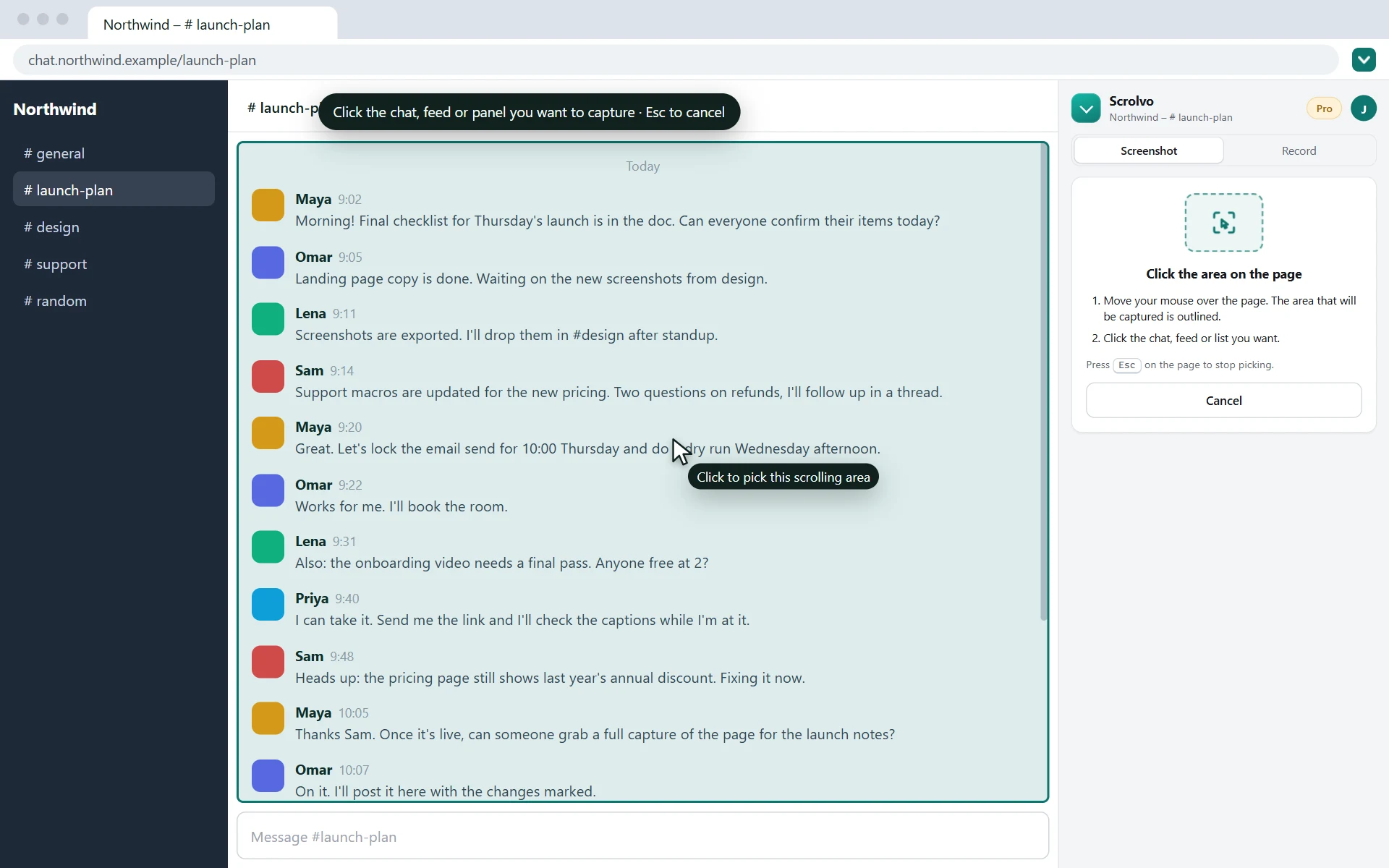
The whole page, and the chat inside it
Ordinary tools stop at the window. Showzlr also scrolls the chat, feed or inbox inside the page and captures it from the first message to the last, as one image.
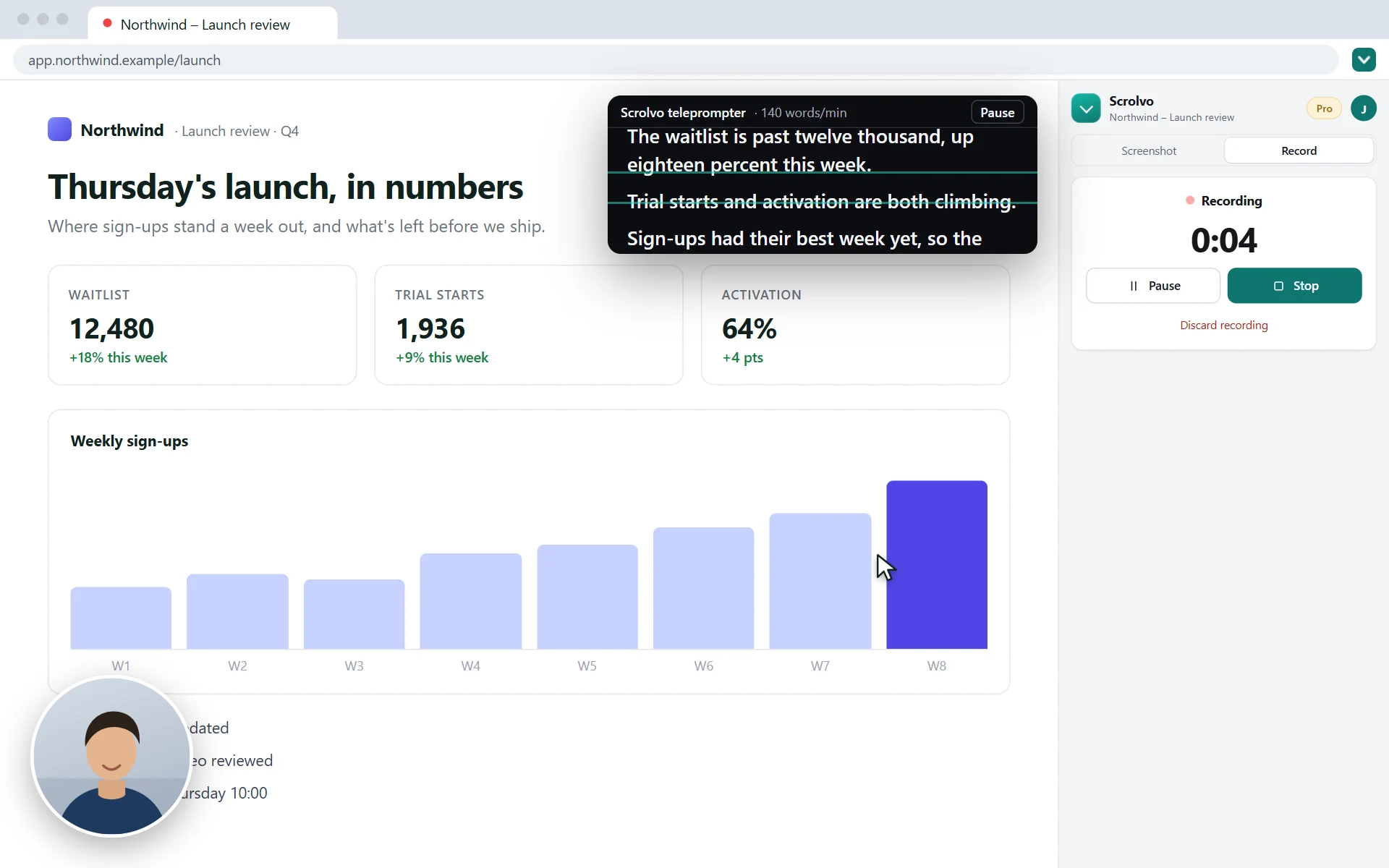
The whole recording
Record a tab, a window or your screen for as long as you need, up to 4K, with your mic and camera. No time limit, no watermark, and the MP4 is free.
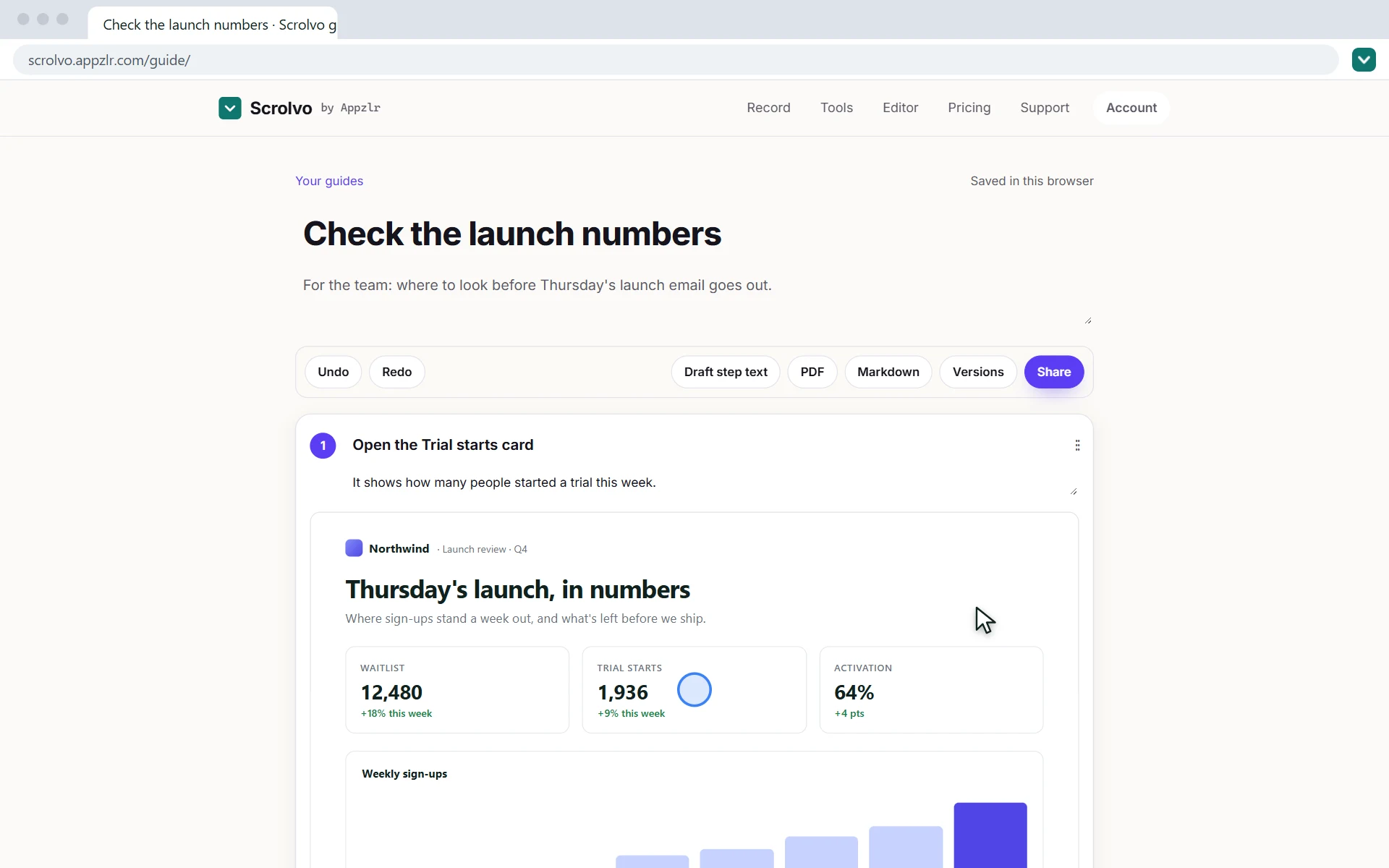
Every step
Click through a task once while recording a tab. Each click becomes a numbered step with its own screenshot, ready to save as a PDF or share as a link.
- Long chats · WhatsApp Web, Slack
- Social feeds · timelines, comments
- Inboxes and dashboards · lists, panels
- Tables and side panels · anything that scrolls
See Showzlr in one minute
Full page screenshots, the screen recorder and step-by-step guides, shown from install to download.
One recording, three things to send
Record a tab once, then send whatever the other person needs.
A video link
Share it as a link, free with an account. Viewers need no account and can comment at the exact moment. Or download the MP4 or a GIF.
A step-by-step guide
Press Make a guide and every click becomes a numbered step with its screenshot. Reword it, blur what's private, then save a PDF or share a link.
A clip for socialPRO
Make it social turns it into a 9:16, 4:5 or square video with zooms on your clicks and captions drawn in, for Shorts, Reels and TikTok.
Got a MOV from a Mac or a camera? The free MOV to MP4 converter turns even a 1 GB file into an MP4 in seconds, in your browser.
Your captures and recordings stay on your computer
Everything is made in your browser. A file only leaves your computer when you share it as a link or send it for an AI edit. Read the full privacy policy.
- The extension has no analytics, ads or tracking, and never records your browsing
- While recording a tab, Showzlr notes where you click, never what you type
- A recording you didn't save is offered back the next time you open the side panel
- Payments go through Paddle; the extension never sees your card
Pro, for when it has to look right
Free gets you the whole thing. Pro is for sending it to someone: mark it up, hide what shouldn't be seen, and make recordings look finished.
- The screenshot editor: crop, arrows, boxes, text and numbered steps
- Blur names, emails and numbers before you share
- Auto-zoom on every click in tab recordings
- Make it social: 9:16, 4:5 and square clips with captions
- Share links kept for 30 days or until you delete them, with no Showzlr footer
Start free. Upgrade when you share your work
Capturing, recording and guides are free, with no account. Pro is one flat price for one person, not per seat, and starts with a 7-day free trial. Compare every feature.
Free
Free
For capturing and recording on your own. No account, no watermark, no time limit.
- Full page, scrolling area and visible area screenshots
- Screen recording with no time limit
- Step-by-step guides
- Download as PNG, JPG or PDF
- Share links: 10 at a time, up to 7 days
- Shots per capture: 150
Pro PRO
$10/month
or $100/year, 2 months free
For bug reports, how-tos, support replies and records that have to look right.
Everything in Free, plus
- Screenshot editor
- Blur and redact
- No repeating sticky headers
- Beautify
- Longer share links
- Auto-zoom
- Guide exports and sharing
- Longer captures
Pro + AI Recommended
$20/month
or $200/year, 2 months free
Everything in Pro, plus AI edits: select part of a screenshot, say what to change, done.
- Remove a cookie banner or fix a typo
- Write the title and note for every guide step
- 100 AI uses a month
7-day free trial for new subscribers, nothing charged until it ends. Cancel any time from your account. Prices in USD, billed by Paddle.
Everything Pro adds
- Screenshot editorCrop every capture and add arrows, boxes and text, or edit any image you open.
- No repeating sticky headersFixed bars and banners appear once instead of down the whole image.
- Blur and redactHide emails, names and numbers before you share.
- Highlighter, numbered steps and penMark what matters and number the steps.
- PDF with URL and timeThe page URL and capture time on every page, plus WebP export.
- BeautifyBrowser frame, padding and a backdrop for polished shots.
- Longer share linksKeep links to captures and recordings for 30 days or until you delete them, with a password, a button and no Showzlr footer. Free links last up to 7 days.
- Auto-zoomTab recordings zoom in on every click by themselves, ready as an MP4 or a share link.
- Guide exports and sharingMaking and sharing guides is free, with PDFs and links of up to 10 steps. Pro adds PDFs of any length, Markdown export, version history and links of up to 100 steps with no Showzlr footer.
- Longer capturesUp to 1000 shots per capture instead of 150.
- Make it socialOne click turns a recording into a 9:16, 4:5 or square video with a background, auto-zoom and captions drawn in.
Questions and answers
Is Showzlr free?
Capturing is free: full page, scrolling-area and visible-area screenshots and autoscroll, saved as PNG, JPG or PDF, with no account needed. The screen recorder (with cutting, captions and MP4 downloads) and step-by-step guides are free too, and so are share links for screenshots, videos and guides with a free account. Showzlr Pro adds the screenshot editor (crop, arrows, boxes, text, blur and more), sticky header removal, the page URL and capture time on PDFs, longer captures, auto-zoom, share links kept for 30 days or until you delete them, and guide PDFs of any length for $10/month or $100/year. Pro + AI adds 100 AI edits a month for $20/month or $200/year. First-time subscribers get a 7-day free trial of either plan.
Can it screenshot a whole chat, like WhatsApp Web or Slack?
Yes. Chats scroll inside the page rather than the window, so open the side panel, choose Scrolling area, click the message list and press Capture the whole area. It scrolls that list from top to bottom and stitches it into one image. Chat apps load older messages as you scroll up, so scroll up to the first message you want before you capture.
Can Showzlr record my screen?
Yes, free. In the extension, choose Record to record a tab with its sound, your microphone and a camera bubble on the page, or Scroll recording for a smooth video of a page scrolling from top to bottom. To record a window or your whole screen with your camera in the corner, use the online recorder at showzlr.com/record, which also has a teleprompter. There's no time limit and no limit on how many you make. Recordings stay on your computer; cut them, add captions, save them as MP4 or a GIF, or share them as a link where viewers can comment, free with an account.
Can Showzlr make a step-by-step guide?
Yes, free. In the side panel, choose Record, then A tab, and click through the task once. Stop, then press Make a guide: every click becomes a numbered step with a screenshot from just before it and the spot you clicked marked. Reword, reorder and blur the steps, then export a PDF of up to 10 steps. Guides are kept in your browser. Sharing a guide as a link of up to 10 steps is free with an account. Showzlr Pro adds PDFs of any length, Markdown export, version history and longer guide links, and Pro + AI writes the step text.
What does Showzlr Pro unlock?
Pro is for people who share their captures. It unlocks the screenshot editor's markup (crop, arrows, boxes, text, highlighter, numbered steps and pen), blur and redaction, sticky header removal, beautify with a browser frame and backdrop, PDFs stamped with the page URL and capture time, WebP export, captures of up to 1000 shots instead of 150, auto-zoom on tab recordings, share links kept for 30 days or until you delete them, and guide PDFs of any length with Markdown export, version history and longer guide links. It's $10/month or $100/year, for one person, not per seat. Pro + AI adds 100 AI uses a month for $20/month or $200/year.
How does billing work?
Checkout is on showzlr.com and is handled by Paddle, our reseller and merchant of record, so the extension never sees your card. Prices are in USD: Pro is $10/month or $100/year and Pro + AI is $20/month or $200/year, with two months free on the yearly plans. If you've never subscribed, either plan starts with a 7-day free trial: you add a payment method at checkout, nothing is charged during the trial, and cancelling before it ends costs nothing. Already on Pro? Switching to Pro + AI charges only the prorated difference.
How do I cancel Showzlr Pro?
Open the Pro dialog in Showzlr and click Manage subscription, or sign in to your account at showzlr.com/account/. You can cancel any time, and Pro stays on until the end of the period you paid for. Cancel during the 7-day free trial and you aren't charged at all. The free version keeps working as before.
Where do my screenshots go?
They stay on your computer. You download each capture as a PNG to your Downloads folder, or open it in Showzlr's editor, which runs in your browser. Screenshots and page content are never uploaded, with two exceptions you choose: an AI edit on Pro + AI sends only the image or area you're editing to Google's Gemini API, and a share link (free with an account) uploads that one capture, which is deleted when the link expires.
Which permissions does the extension need, and why?
When you install it, Chrome says Showzlr can read and change all your data on all websites. That's because you capture whatever site you're reading, so its script has to run on any page; it only scrolls the page, measures the part you picked and takes the shots, and nothing on a page is collected or sent anywhere. It also asks to save files to your Downloads folder and to keep its settings and your last few captures in local storage. Screen recording goes through Chrome's own picker, and the camera and microphone through Chrome's standard prompt. Apart from a share link you create or an AI edit you ask for, the only network requests are for your optional Appzlr account, your Pro status and the plans on offer. There's no analytics, ads or tracking code in the extension, and your browsing is never recorded.
What happens if I uninstall the extension?
Screenshots and recordings you've downloaded stay in your Downloads folder, and guides stay in your browser's storage for showzlr.com. Captures still waiting in the side panel are removed with the extension. Uninstalling doesn't cancel a subscription: cancel it from your account at showzlr.com/account/ if you don't want it. Reinstall any time and Pro is back as soon as you sign in.
Can I edit a screenshot with AI?
Yes, with Showzlr Pro + AI. In the editor, pick the AI tool and describe the change: remove a banner, fix a typo, blank out a chart, change a button's text. It edits the whole image, or drag over a part first to change only that area. Ctrl+Z undoes it. Pro + AI includes everything in Pro plus 100 AI edits a month, for $20/month or $200/year.
Can it remove sticky headers from a full page screenshot?
Yes, with Showzlr Pro. Fixed and sticky bars, banners and buttons appear once instead of repeating down the whole image. On the free plan, a larger overlap between frames or picking the inner scrolling element usually avoids them.
Can I save a full page screenshot as a PDF?
Yes, for free. When a capture finishes, click Download PDF in the side panel: Showzlr splits it into pages, breaking between lines of text, and saves it without opening another tab. With Showzlr Pro, the editor also prints the page URL and capture time on every page, and exports WebP. PNG and JPG are free too.
Which browsers does Showzlr work in?
Google Chrome 116 or later on Windows, macOS, Linux and ChromeOS. It's also on Firefox Add-ons for Firefox 140 or later on Windows, macOS and Linux, where it opens in the sidebar; there a recording has your microphone but not the tab's sound, and auto-zoom isn't available. Microsoft Edge installs it from the Chrome Web Store. It doesn't run on Safari or mobile browsers.
Did we miss something you need?
Tell us what you'd like Showzlr to do next. Leave your email and we'll let you know if we build it.
Thanks, we've got it.
We read every request, and we'll write to you if it ships.
Capture the whole page, not just the screen
Add Showzlr to Chrome in a few seconds. Capturing, recording and guides are free with no account, and Pro comes with a 7-day free trial when you need it.
Also free on this site, in any browser
Record, convert, trim and edit on this site with no extension. Free, and nothing is uploaded.
How to do more with Showzlr
- Screenshot a whole WhatsApp Web chat
- Screenshot a long Slack conversation or thread
- Screenshot a whole ChatGPT conversation
- Screenshot a whole Discord channel, thread or DM
- Screenshot a long Gmail email thread
- Screenshot a whole X (Twitter) thread with replies
- Screenshot a long Microsoft Teams chat or channel
- Screenshot a whole Messenger or Instagram chat
- Screenshot a Facebook post with all comments
- Save a full page screenshot as a PDF
- Full page screenshots without repeating sticky headers
- Blur or redact private details in a screenshot
- Share a screenshot as a link that expires
- Annotate a screenshot with arrows, boxes, text and steps
- Edit a screenshot with AI
- Make a step-by-step guide from a screen recording
- Make an SOP in Chrome
- Make a how-to guide with screenshots
- Record longer than Loom's 5-minute limit
- Loom free plan limits
- Download a Loom video
- Cancel Loom without losing your videos
- Loom alternative for Chromebook
- Loom alternative for Linux
- Loom pricing
- Full page screenshot in Chrome
- Auto-zoom screen recorder
- Scrolling screenshot in Chrome
- Screen recording to GIF
- Showzlr Free vs Pro: what each plan includes
- Free Loom alternative
- Free Screencastify alternative
- Every tool side by side
Need help?
Questions, bugs or ideas: email emaki@appzlr.com and a person will reply. Billing is in your account.